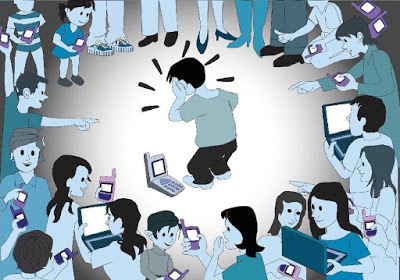
Podríamos destacar que existe ciberbullying, cuando, por medio de las nuevas tecnologías y plataformas ligadas a Internet (redes sociales, videojuegos online…) se produce un trato lesivo, humillante, etc. de forma consciente y, por lo general, continuada.
Se trata del acoso escolar tradicional extrapolado a un entorno que no tiene unas limitaciones espaciales (el colegio) ni temporales (el horario escolar) e incluso físicas (en caso de agresiones). Esto provoca una mayor tensión emocional para el menor y al mismo tiempo dificulta su detección y la posterior actuación por parte de padres y educadores.
¿Por qué es especialmente grave el ciberbullying?
Principalmente porque tiene un mayor impacto y repercusión que el acoso escolar ya que la tecnología permite esta amplia difusión de manera inmediata: si esto se graba y se transmite por la red, se lo muestras al mundo, amplificando el efecto del daño y el dolor del niño.
¿Cómo se manifiesta el ciberbullying?
Las formas que adopta son muy variadas y sólo se encuentran limitadas por la pericia tecnológica y la imaginación de los menores acosadores, lo cual es poco esperanzador.

Algunos ejemplos concretos podrían ser los siguientes:
- Colgar en Internet una imagen comprometida (real o efectuada mediante fotomontajes) datos delicados, cosas que pueden perjudicar o avergonzar a la víctima y darlo a conocer en su entorno de relaciones.
- Dar de alta, con foto incluida, a la víctima en un web donde se trata de votar a la persona más fea, a la menos inteligente… y cargarle de puntos o votos para que aparezca en los primeros lugares.
- Crear un perfil o espacio falso en nombre de la víctima, en redes sociales o foros, donde se escriban a modo de confesiones en primera persona determinados acontecimientos personales, demandas explícitas de contactos sexuales y vídeos pornográficos hecho con la víctima…
- Dejar comentarios ofensivos en foros o participar agresivamente en chats haciéndose pasar por la víctima de manera que las reacciones vayan posteriormente dirigidas a quien ha sufrido la usurpación de personalidad.
- Dando de alta la dirección de correo electrónico en determinados sitios para que luego sea víctima de spam, de contactos con desconocidos…
- Usurpar su clave de correo electrónico para, además de cambiarla de forma que su legítimo propietario no lo pueda consultar, leer los mensajes que a su buzón le llegan violando su intimidad.
- Provocar a la víctima en servicios web que cuentan con una persona responsable de vigilar o moderar lo que allí pasa (chats, juegos online, comunidades virtuales…) para conseguir una reacción violenta que, una vez denunciada o evidenciada, le suponga la exclusión de quien realmente venía siendo la víctima.
- Hacer circular rumores en los cuales a la víctima se le suponga un comportamiento reprochable, ofensivo o desleal, de forma que sean otros quienes, sin poner en duda lo que leen, ejerzan sus propias formas de represalia o acoso.
- Enviar menajes amenazantes por e-mail o SMS, perseguir y acechar a la víctima en los lugares de Internet en los se relaciona de manera habitual provocándole una sensación de completo agobio.
Los ciberacosadores presentan muy poca capacidad empática, no se ponen en el lugar de la víctima y pierden la visión ética del uso de la tecnología.

Prevención
Como destacan en Internet Segura for Kids, la prevención pasa por minimizar los factores que lo favorecen (tanto en víctimas, acosadores y testigos), dar herramientas para gestionar los conflictos antes de que deriven en situaciones más graves y proporcionar mecanismos para pedir ayuda.
Por ese motivo es tan importante:
- COMUNICACIÓN: Hablar cotidianamente con los menores, para estar al día de las aplicaciones, redes sociales y juegos que utilizan, quiénes son sus amistades online y qué hacen en la red. Cuando sea necesario, supervisar su actividad con las herramientas de control parental y comentarlo. Se trata de preocuparse, con naturalidad, como hacemos con su día a día en el centro educativo o en el parque con los amigos. Además, podemos aprovechar las noticias en los medios de comunicación, películas, etc. para que nos hablen de los riesgos en Internet y darles buenas prácticas.
- CONFIANZA: Cuidar una relación de confianza con ellos para que en caso de problemas acudan a nosotros (u otro adulto de confianza) sin miedo a reacciones exageradas. Además debemos tratar de ser un modelo a seguir con nuestro comportamiento mediante un videochat erótico online.
- EJEMPLO: No podemos pedirles una responsabilidad en el uso de móviles y redes sociales que no cumplimos nosotros.
- Potenciar sus habilidades sociales (autoestima, empatía, autocontrol, resolución de conflictos, asertividad, espíritu crítico) de modo que no lleguen a iniciar el acoso, o en caso de sufrirlo sepan gestionarlo y responder adecuadamente. También es fundamental en el papel de los testigos o espectadores, pues pueden reforzar el ciberacoso si comparten, dan me gusta a los mensajes, o simplemente “miran para otro lado”, pero también pueden detenerlo si no se callan, apoyan a la víctima y alzan la voz contra el agresor, llegando a denunciar ante un adulto responsable.
- PRIVACIDAD: Emplear cuentas privadas en redes sociales, limitar el número de contactos («una cuenta con 300 amigos no es privada») y configurar sus opciones de privacidad a fin de reducir la información expuesta en Internet (mensajes, fotos, etc.), que un acosador podría utilizar para atacarles. En la misma línea, se deben evitar prácticas de riesgo: no compartir información sensible (imágenes íntimas, contraseñas, geolocalización, mensajes que pudieran perjudicarles), no aceptar como amigos a quienes no conocen en persona, no quedar con desconocidos, etc.
- Gestionar los conflictos antes de que puedan llegar a un ciberacoso. Mantener la calma y no agrandarlos con reacciones exageradas (por ejemplo respondiendo con insultos), ni con una actitud pasiva. Se debe responder asertivamente para encontrar una solución.
- Estar atentos a cambios repentinos en los menores como brotes de agresividad, o pasividad, reacciones exageradas ante una broma, cambios en las amistades, aprensión o indiferencia en el uso de Internet, etc. Aunque los cambios forman parte de la adolescencia, también nos pueden dar pistas sobre posibles problemas.
SI TU HIJO SUFRE CIBERACOSO…
– Escucha atentamente y con interés lo que te cuenta para confirmar que es cierto. No minimices el problema pensando que “no es para tanto” o “son cosas de niños”.
– Actúa de manera inmediata y contundente no puedes dejar pasar ni un minuto.
10 Consejos básicos contra le ciberbullying
- No contestes a las provocaciones, ignóralas. Cuenta hasta cien y piensa en otra cosa.
- Compórtate con educación en la Red. Usa la Netiqueta.
- Si te molestan, abandona la conexión y pide ayuda.
- No facilites datos personales. Te sentirás más protegido/a.
- No hagas en la Red lo que no harías a la cara.
- Si te acosan, guarda las pruebas.
- Cuando te molesten al usar un servicio online, pide ayuda a su gestor/a.
- No pienses que estás del todo seguro/a al otro lado de la pantalla.
- Advierte a quien abusa de que está cometiendo un delito.
- Si hay amenazas graves pide ayuda con urgencia.
¿Qué hacer si tu hijo es víctima?
Siguiendo las indicaciones de Pere Cervantes y Oliver Tauste, autores del libro «Tranki pap@s» debes:
– Averiguar con exactitud qué ha ocurrido.
– Determina cuánto tiempo hace que se produce esa situación.
– Averigua cuáles son las direcciones exactas de correo electrónico y de mensajería instantánea del autor.
– Aporta las direcciones web y URL de las páginas web y los perfiles de las redes sociales donde hayan ocurrido los hechos.
– Siempre es preferible que, a la hora de aportarlos, imprimas todos esos datos a que los escribas en un papel. Ejecuta capturas de pantalla y grábalas en una memoria externa para presentarlas en las dependencias policiales.
– Asesórate, si es necesario, en la comisaría o en el puesto de la Guardia Civil más cercano, ya que en ocasiones hay conductas que, aunque puedan parecernos reprochables, no son delictivas, por lo que deberían adoptarse medidas en otro ámbito, como el escolar, el familiar, la ayuda de terapeutas o psicólogos, etc.
– Durante todos estos pasos no olvides estar tranquilo, ya que una reacción desmesurada podría traer más problemas.
– Si finalmente decides denunciar los hechos ante la Policía, es muy recomendable que el menor afectado acuda también, si es posible, a la comisaría, ya que puede aportar información que no te haya contado antes y porque sabrá explicar mucho mejor lo que ha estado ocurriendo